Basecamp Resorts
Everwild Spa
Grizzly Ridge
Pine & Peaks
Revy Suites
Timber Peaks
Wildwood Spa
BCR – How to edit Rooms
How to Edit Rooms
Rooms are managed as a custom content type in the WordPress dashboard and use ACF (Advanced Custom Fields) for content management.
Step 1: Log In to WordPress
Go to the WordPress Dashboard
Visit: https://basecampresorts.com/wp-admin
Enter your login credentials
Step 2: Open Photos
In the left sidebar, click Rooms
Click All
Look for the room you want to edit
Click Edit

Step 3: Edit ACF Fields
Scroll down to the ACF section and update the following fields as needed
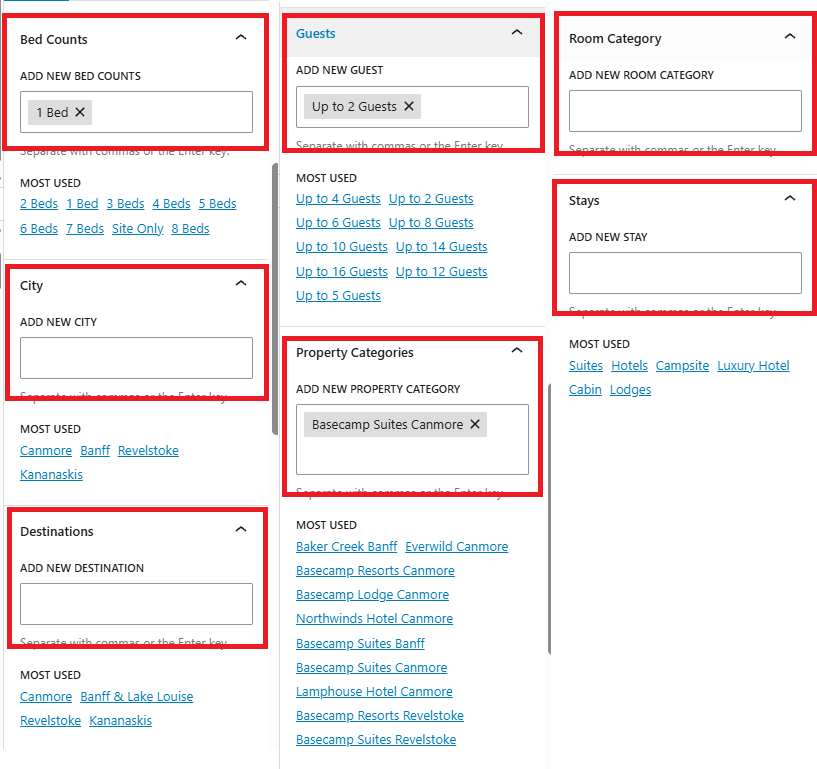
Step 4: Assign Categories
On the right-hand side of the editor, select the appropriate categories
These categories determine where the offer appears across the website.
Step 5: Save Your Changes
-
Click Update
-
Wait for confirmation that the offer has been updated
Step 6: Review the Offer
Visit the relevant page on the website to confirm:
Content displays correctly
Images appear properly
The offer is assigned to the correct property or destination
Important Notes
-
Categories control visibility
-
Changes go live immediately after clicking Update
-
Only edit fields you recognize